
Please refer to the diagram and corresponding steps below for a detailed description of the Innovo services network topology.
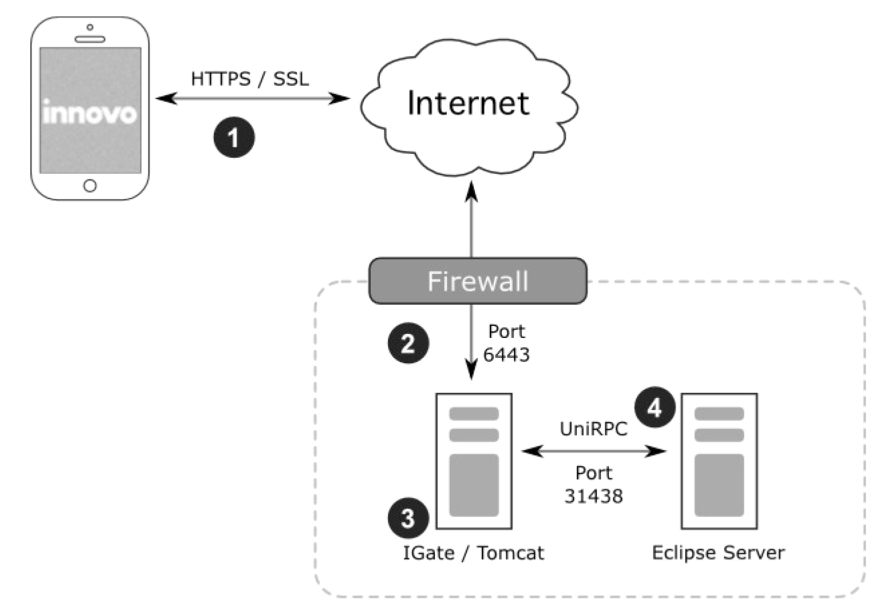
- All of the Innovo applications communicate with the Innovo Comm Server using standard HTTPS web calls. All of this traffic is encrypted using SSL; no passwords, customer details, or other sensitive information will ever be transmitted in plain text. You will need to create a DNS entry or provide an existing one that can be mapped through your firewall to the Innovo Comm Server.
- Port 6443 must be open through your firewall and must be mapped to the web server running the Innovo Comm Server. Port 6443 is our standard port but, if that happens to conflict with another service, we can select a different port.
- If you already have an iGate provided by Epicor, this can be used to host the Innovo Comm Server. You may also use a standalone server or virtual machine. The Innovo Comm Server is a very lightweight Apache Tomcat instance, which does not consume a lot of resources.
- The Innovo Comm Server communicates with your Eclipse server using the standard UniVerse RPC service. This RPC service communicates over port 31438. You will need to ensure that the server hosting the Innovo Comm Server is able to connect to your Eclipse server over this port.
Comments
Article is closed for comments.